CSV product import: beyond the platform's built-in importer
CSV is the most universal format for product data. Every store platform can import it, every supplier can produce it, and anyone can open it in a spreadsheet. That makes CSV a natural choice for moving products into a store, whether it runs on Shopify, WooCommerce, OpenCart, PrestaShop or another platform. It also makes it easy to underestimate how much work CSV imports require once they become a daily routine.
Built-in CSV import: what it does well
Platform importers are good at one thing: loading a file that already matches the platform's template. They are fine for a one-time migration or for a small catalog that you edit in a spreadsheet yourself.
Where it falls short
The main problem is that supplier files never match the template. Columns have different names and order, so each file needs converting before upload. There is no pricing logic either: markups, currency conversion and rounding all have to be done in the spreadsheet beforehand.
The importer does not merge suppliers, so the same product from two suppliers becomes two products, or the second file overwrites the first. There is no schedule, which means someone has to download, convert and upload the file every time. And checks are limited: a shifted column can overwrite prices across the whole catalog before anyone notices.
Common CSV problems and how to avoid them
- Encoding. Non-Latin characters turn into garbage when the file is saved in the wrong encoding. Use UTF-8.
- Delimiters. Commas, semicolons and tabs are all used. Check which one the supplier uses before mapping.
- Decimal separators. "12,50" and "12.50" mean the same to a person but not to an importer.
- Leading zeros. Spreadsheets drop leading zeros from barcodes and SKUs. Treat these columns as text.
- Line breaks inside fields. Descriptions with line breaks need proper quoting, or rows split in half.
A better process for recurring CSV imports
- Map each supplier's CSV columns to your product fields once.
- Link products to your catalog by SKU or barcode.
- Apply pricing rules during import, not in a spreadsheet.
- Export to the store in the format it needs.
- Run it on a schedule and check the log.
CSV import with YfiFX
A supplier CSV is read as it is, without converting it to your platform’s template first. Delimiter, encoding and the header row are detected automatically, and columns are then mapped once for that supplier.
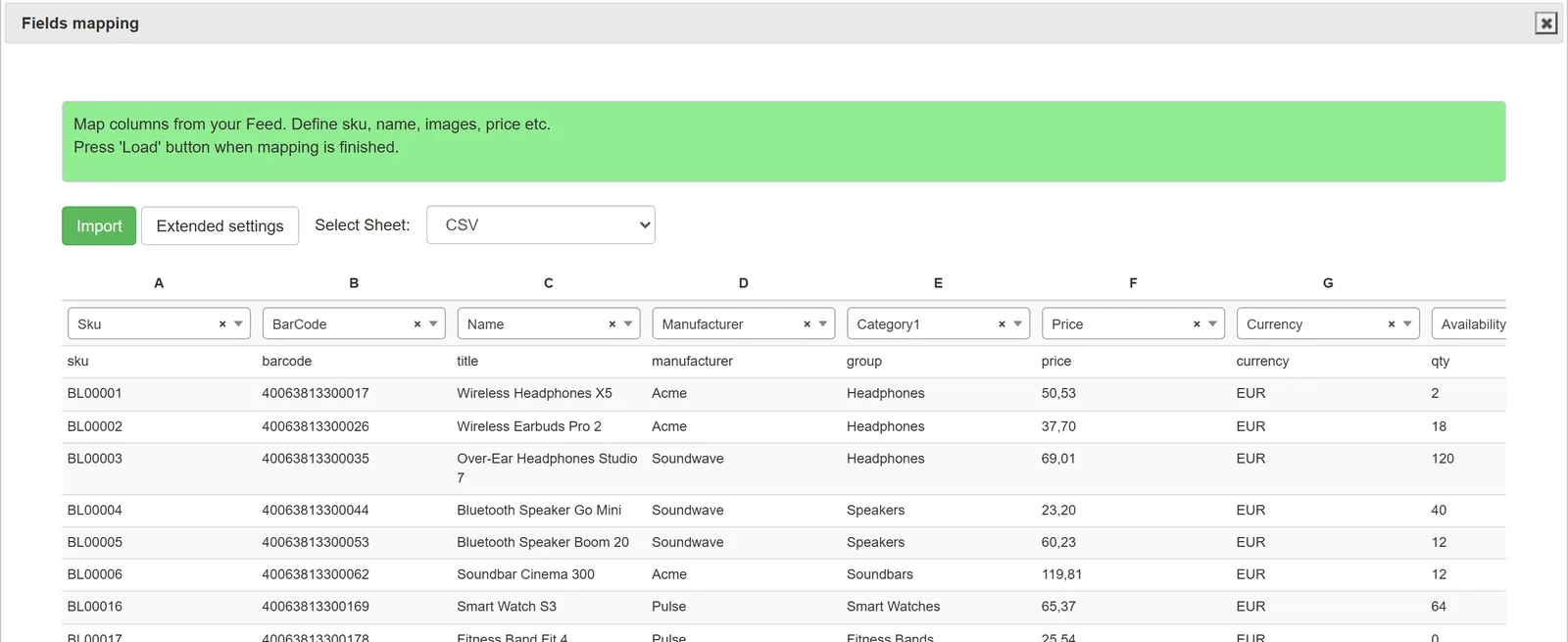
Products are linked to the Main feed, prices are calculated with your markup rules, and the result is exported to Shopify, WooCommerce, OpenCart, PrestaShop, CS-Cart, Shop-Script, Horoshop, Prom.ua or a feed file on schedule.
Frequently Asked Questions
How is this different from my platform's CSV importer?
The built-in importer loads a file in its own template once. YfiFX reads each supplier's file as it is, links products across suppliers, calculates prices with your rules and updates the store on a schedule.
Can CSV files update existing products?
Yes. Products are linked by SKU or other fields, so new files update prices, stock and other fields of existing products and add new ones.
Can I map custom columns?
Yes. Any column from a supplier's file can be mapped to a field in your catalog, including custom attributes.
Set it up once. YfiFX does the rest
14 Days Free Trial. Sign up and import your first price list today.