Scheduling product imports: when and how often to update
Automation removes the need to start imports by hand, but it raises a new question: when should they run? Too rarely, and the store shows outdated prices and stock. Too often, and you load your systems without gaining fresher data. The right schedule follows your suppliers, your sales pattern and your platform's limits.
Start with your suppliers
Ask each supplier when they update their price list or feed. Many publish once a day, early in the morning, and some update again in the afternoon. Running your import before the supplier's update just reloads yesterday's data. Running it shortly after gives you the newest prices and stock.
Consider your sales pattern
Most online stores have clear peaks, often in the evening and on weekends. Schedule a run before the peak so customers see current data when most orders come in. Avoid heavy imports during the peak itself if your store slows down while updating.
Respect platform limits
Store platforms and marketplaces limit how many updates they accept per minute or per day. A large catalog updated too often can hit these limits and leave the update half done. Fewer, well-timed runs are more reliable.
Run the whole chain in order
An update has three stages: import from suppliers, recalculation of prices, export to channels. They should run as one chain, in that order. If the export starts before the import finishes, the store receives a mix of old and new data.
A typical schedule
- Morning: after the main suppliers publish their data, run the full chain.
- Afternoon: a second run for suppliers that update later and for fast-moving products.
- Before the evening peak: optional run for categories where stock changes quickly.
For many stores, two runs a day are enough. Stores with fast-moving stock or price-sensitive categories benefit from three or four.
Watch the results
Look at how long each run takes. If it grows over time, the catalog may have outgrown the schedule, or a supplier's file may have become much larger. Check the logs after the first runs of any new schedule.
Scheduling in YfiFX
A schedule is a list of commands that run in the order you put them: an import for each supplier, a recalculation of the Main feed, then the export. The schedule below runs at 06:00 and 14:00, which covers two typical supplier update times. The editor also shows the cron equivalent and the next launch, and does not allow runs closer than 60 minutes apart.
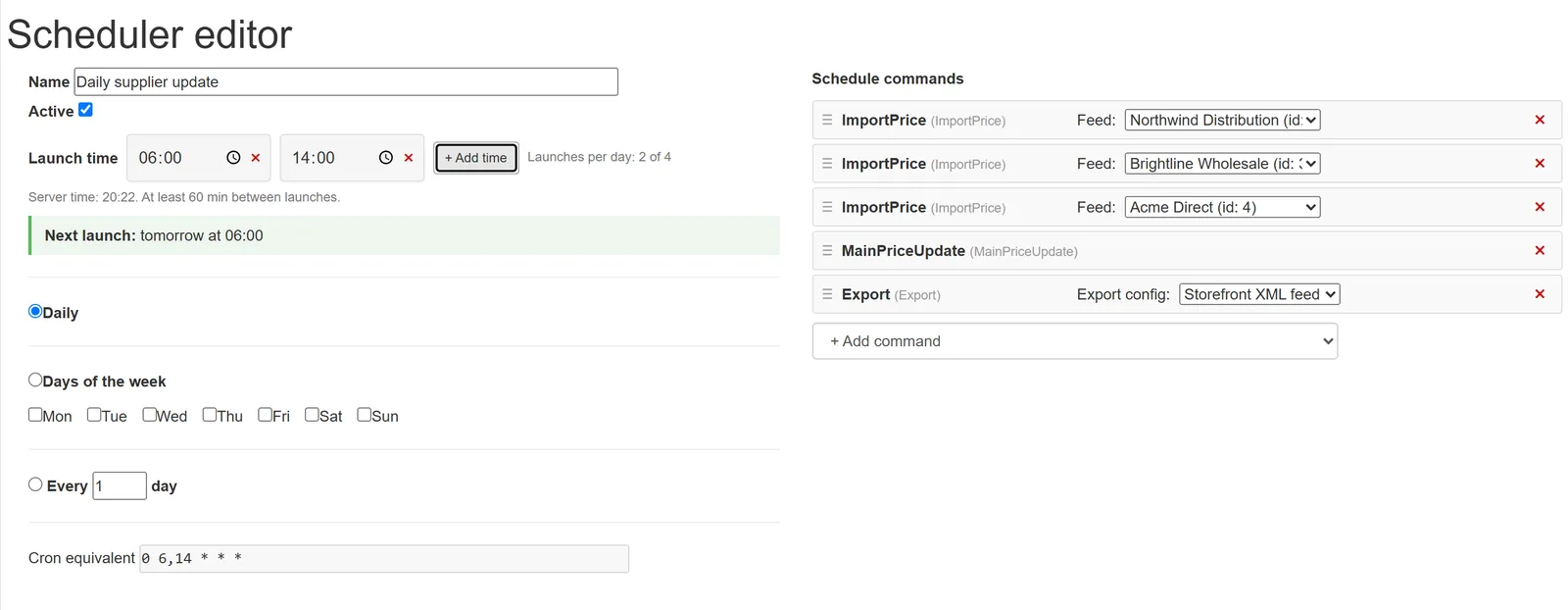
The number of automatic runs per day depends on the plan: one on Free and up to four on Business, with more on a custom plan. An urgent supplier update can always be imported by hand.
Related Articles
Set it up once. YfiFX does the rest
14 Days Free Trial. Sign up and import your first price list today.